
HERC CONTROL / SOFTWARE
SmartCo
Model Predictive Control for industrial processes
SmartCo is a software-based industrial controller that combines model predictive control (MPC), OPC connectivity, process trends and simulation in one environment. It helps engineers configure control loops, observe their behaviour and evaluate how they respond to changes in the process.
Designed for use with existing plant automation, SmartCo can operate multiple independent loops from a computer or virtual machine. Start with a specific process challenge and build a control strategy around your measurements, operating limits and plant expertise.
- Control capacity
- Up to 64 independent loops
- Connectivity
- OPC UA & OPC Classic DA
- Process types
- Self-regulating & integrating
- Evaluation
- Simulator with demo licence
One workspace, from connection to control
SmartCo brings four working parts together: the OPC client, the MPC controller, the graphical interface and a simulator available with a demo licence. The same environment lets your team connect signals, configure a loop, inspect its response and explore changes in simulation.
Bring plant signals into view
Map measurements, targets and outputs to the OPC tags already available in your automation system.
Describe your process
Define its response characteristics, operating ranges and disturbances through grouped configuration panels.
Read the whole response
Review process trends, control action and model behaviour together when assessing a change.
Practise before plant trials
Use simulated processes to understand the effect of settings and build familiarity with the software.
Each loop has its own configuration. This lets engineers evaluate one control challenge first, then extend the application to additional loops as the project develops. The supported loop count depends on the licence, up to 64 independent loops per instance.
Which processes can SmartCo control?
SmartCo supports both self-regulating processes, which settle at a new operating point, and integrating processes, where an imbalance causes the process variable to continue changing. Typical applications include temperature, pressure, flow, level and moisture control.
Processes with long response delays, external disturbances or changing operating conditions are useful candidates for MPC evaluation. SmartCo can work alongside existing PID loops; the objective is to improve selected control areas rather than replace every controller in the plant.
Self-regulating processes
A change in the control output produces a response that eventually settles. Heating, pressure and flow applications can exhibit this behaviour. SmartCo describes the response using process characteristics such as gain, delay and time constant.
Integrating processes
A sustained imbalance continues to move the measured value. A tank level, for example, keeps rising when inflow exceeds outflow. These applications need a model that represents the continuing change, rather than an assumed settling point.
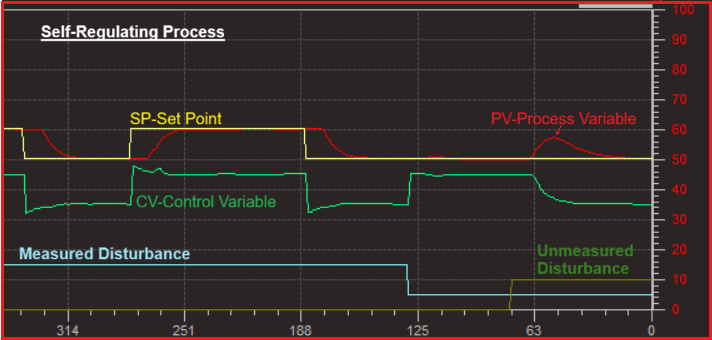
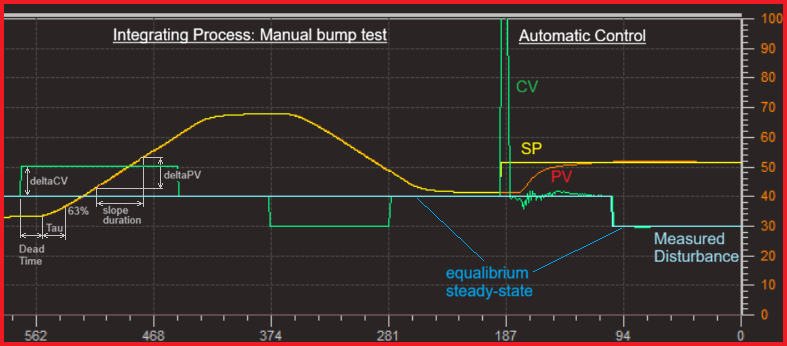
Illustrative responses from the user manual, not guaranteed results for an installation.
Connect to your PLC or DCS through OPC
The built-in OPC client exchanges process measurements and control outputs with compatible OPC servers. SmartCo supports OPC UA and OPC Classic DA, allowing it to connect with the interfaces available in your existing automation environment.
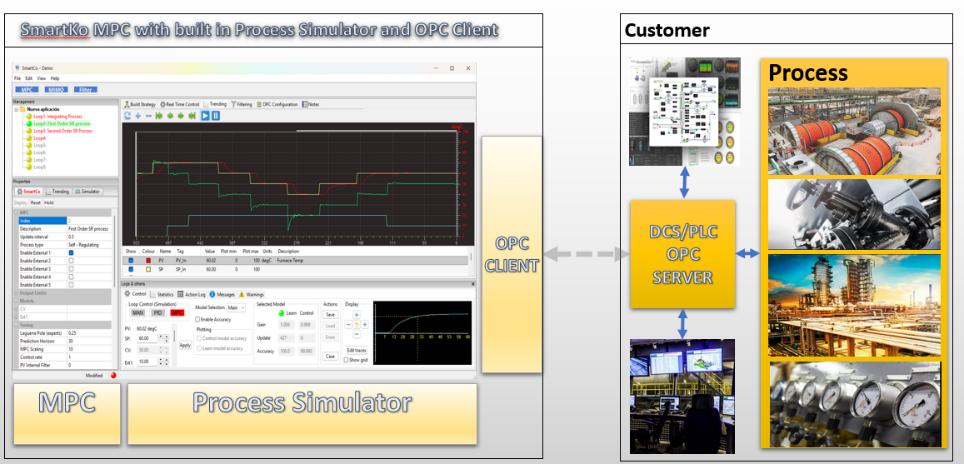
A control loop brings together the measured process value, its target and the control output. Additional measured signals can be included when they have a meaningful influence on the process. Engineers configure the signal descriptions, units, ranges and filtering through the interface.
| Signal | What it tells SmartCo |
|---|---|
| PV · Process value | The measured condition, such as temperature, level or pressure. |
| SP · Setpoint | The target that the controller is working towards. |
| CV · Control output | The action sent back to the plant, within configured output limits. |
| External signals | Up to five measured influences per loop that help describe disturbances. |
| Plant coordination | Control enable, communication monitoring, external limits and operating-case selection. |
OPC interfaces and connection options
SmartCo supports OPC Classic DA 1.0, 2.0 and 3.0, as well as OPC UA. The client can connect to local or remote OPC servers. OPC UA configuration includes server discovery, security settings and authentication options such as anonymous access, username/password and X.509 certificates, depending on the server configuration.
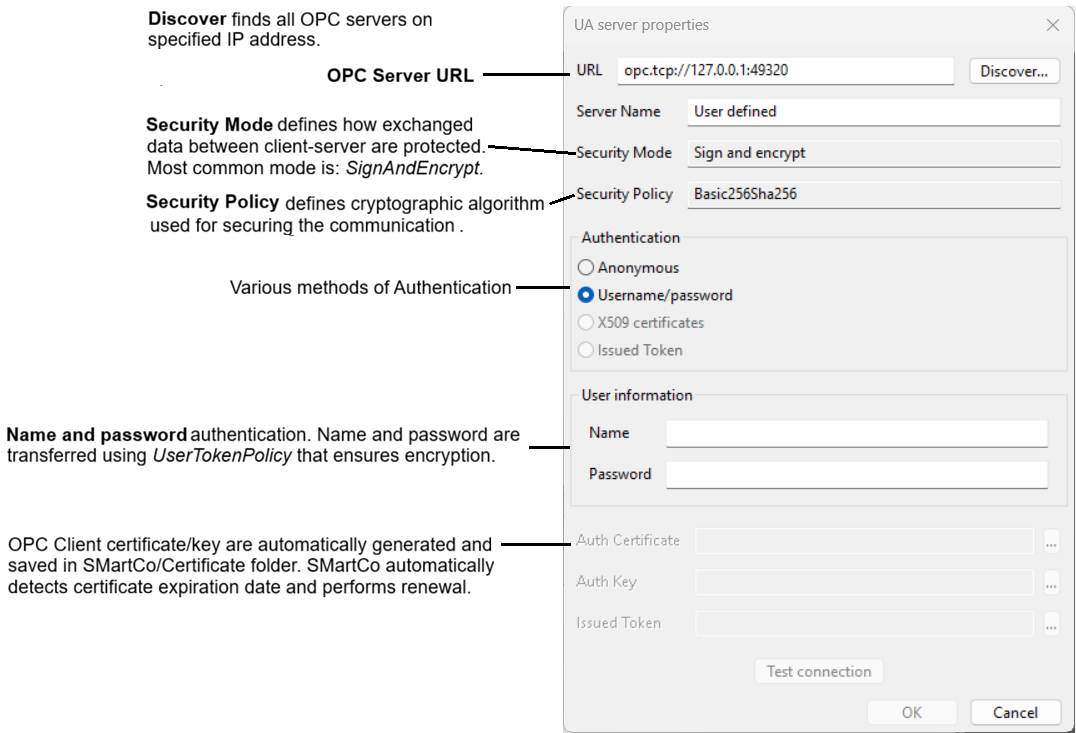
Connectivity and permissions should be agreed with the plant automation team. Tag mapping, engineering units and ranges need to match the actual instrumentation and control system.
Configure control around the process
SmartCo provides a graphical configuration environment for defining loop behaviour and reviewing settings before deployment. Configuration starts with an understanding of how the process responds, including its delay and response characteristics.
- Disturbance handling: include up to five measured external signals per loop and account for unmeasured disturbances.
- Output limits: define minimum and maximum control outputs, including limits received from the plant control system.
- Signal filtering: reduce measurement noise while considering its effect on response time.
- Operating cases: prepare configurations for different operating conditions rather than assuming the process always behaves in the same way.
Give disturbances a place in the control strategy
A feed change, an upstream temperature or another measurable influence can explain why the process moves even when the control output has not changed. SmartCo can use up to five such external signals per loop for feedforward control. Engineers establish the main loop first, then evaluate relevant external signals individually.
Not every influence is measured. SmartCo also includes unmeasured-disturbance handling that uses differences between predicted and actual response to help address model mismatch. Its contribution is configurable, so it can be assessed alongside the main controller.
Different conditions. Appropriate settings.
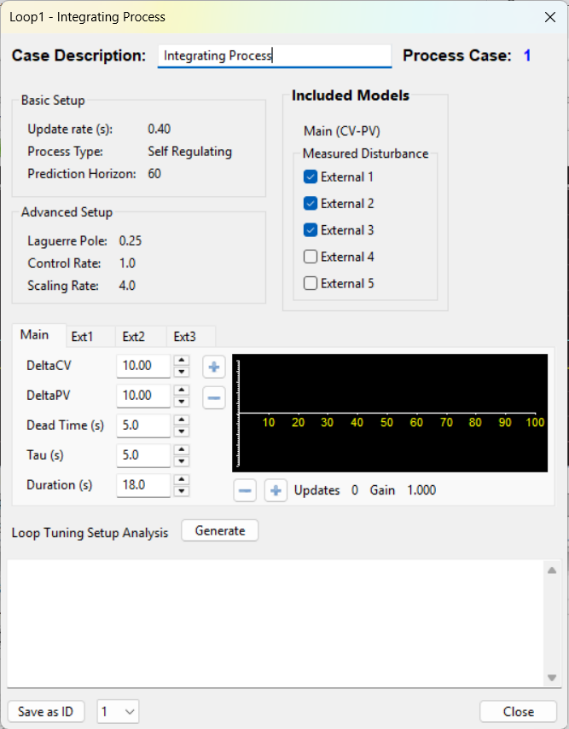
Process Cases allow the controller to use a prepared configuration for a particular operating region. This is useful when process behaviour changes with production conditions, material properties or operating point.
The application supports up to 99 case identifiers. Engineers can configure and review cases through the interface, with case selection supplied by the control system.
Shape the response, not just the target
A useful controller must suit the dynamics of the process and the way the plant operates. SmartCo exposes tuning and filtering controls so your team can work towards an appropriate balance between responsiveness, smooth output and tolerance of noisy measurements.
Prediction horizon · how far ahead the controller considers
The prediction horizon sets the forward-looking scope of the controller. It is considered together with process delay and response speed when tuning how SmartCo approaches the target. The appropriate setting depends on the application.
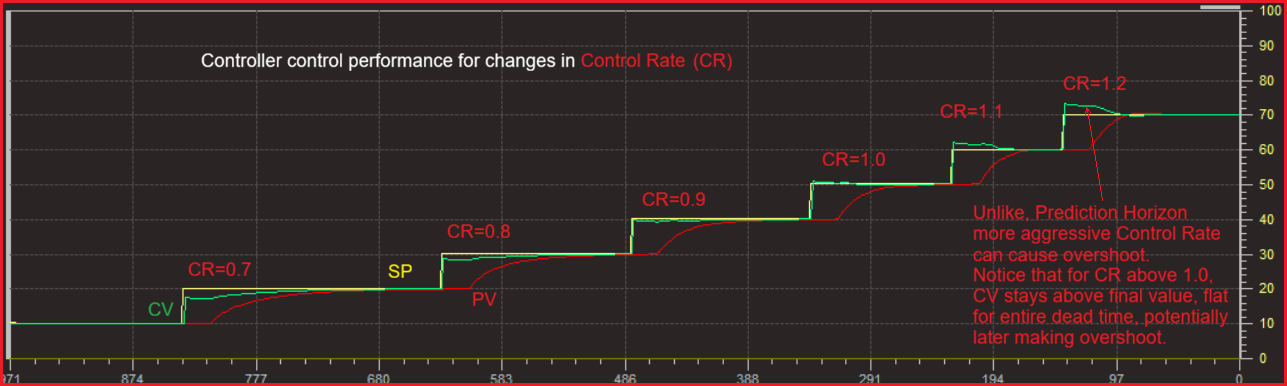
Control rate · how strongly the controller acts
Control rate adjusts the strength of control action. Reducing it can make the response less aggressive; increasing it requires careful evaluation of overshoot and stability. It is a separate adjustment from model-learning speed.
Signal and output filters · managing noise
Input filtering includes moving-average and first-order options. Internal PV and CV filtering provide further ways to manage noisy data and output movement. Filtering also introduces lag, so more filtering is not automatically better: engineers review its effect on both control and learning.
Output limits · staying within the configured operating range
Minimum and maximum output values can be configured in SmartCo or supplied from the plant system. They let the controller work within the available output range as operating conditions change. Plant safety interlocks and protection remain the responsibility of the automation system.
Observe, learn and review performance
SmartCo includes process model learning and displays information about model performance. Engineers can compare predicted behaviour with measured response and review whether the model represents the process adequately.
Trend views bring process values, setpoints and controller outputs together. This helps your team investigate disturbances, assess changes in operating conditions and compare control behaviour over time.
Build a starting model from process knowledge
Engineers begin with estimates of how the process reacts: the size and direction of its response, the delay before a change becomes visible and the time it takes to develop. Historical trends and appropriate process tests help establish these estimates. Integrating processes are described by their continuing rate of change.
Evaluate learning alongside operation
SmartCo supports model learning while control is running and provides information about both control and learning-model performance. Your team can review whether a candidate model follows the observed process before adopting it. Configurable learning ranges help keep model updates focused on suitable operating conditions.
Learning speed is adjustable independently of control rate. This matters when the available process movement is small, measurements are noisy or disturbances make it difficult to distinguish the underlying response.
Keep evidence for the next engineering decision
Trend views help answer practical questions: did the process follow its target, did a disturbance precede the deviation, and how much output movement was needed? CSV trend data and diagnostic logs support further investigation outside the live view.
Learning and configuration tools support engineering judgement. Process understanding, reliable instrumentation and appropriate commissioning remain important to a successful application.
From a process challenge to a working application
SmartCo is designed to put configuration and evaluation in the hands of engineers who understand their plant. A structured workflow turns that knowledge into settings that can be reviewed and refined.
Choose a meaningful control problem
Identify the variable, the operating objective and the conditions that make control difficult. Review instrumentation and existing loop behaviour before attributing a problem to the control algorithm.
Connect and verify the signals
Set up the OPC connection, map the required tags and check units, ranges and signal quality. Confirm how control enable, output limits and case selection will be coordinated with the plant.
Configure the process and its operating cases
Enter response estimates, select appropriate tuning and define any distinct operating regions. Start with the main response before adding measured disturbances.
Validate, deploy and observe
The configuration interface validates settings when they are deployed and reports conflicting entries. Review trends and model performance under agreed commissioning conditions, then refine settings based on what the process actually does.
Projects, configuration and scripting
SmartCo keeps loop, OPC and interface settings within its project configuration. Configuration panels group related parameters, and additional settings become available when the corresponding functionality is enabled. Python scripting supports application-specific workflows; its use should be planned around the needs of the control application.
Project settings, saved models, trends and diagnostic information help your team maintain continuity as the application evolves. Make configuration changes through the software interface and keep project backups as part of normal engineering practice.
Explore control with the process simulator
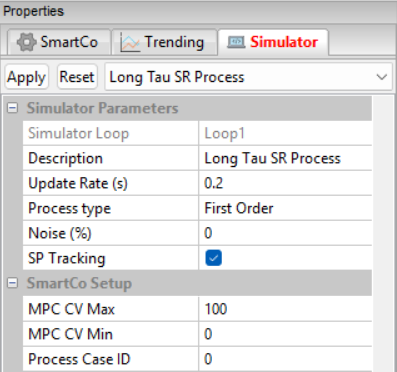
The demo licence includes an integrated process simulator for testing and training without connecting to a live production process. It supports self-regulating and integrating processes, including first- and second-order dynamics.
Explore the effect of process delays, external disturbances, measurement noise and output limits. The simulator also includes PID control, providing a way to compare responses under the selected simulation conditions.
A configurable process, not a fixed animation
Choose first-order, second-order or integrating behaviour, then adjust gain, delay and response characteristics. Add measurement noise, vary the target and observe how the control output and measured value develop over time.
The simulator can include up to five external disturbances and supports operating-case selection and output limits. Its PID settings provide a reference for exploring the same simulated conditions with a different control approach.
Three useful things to try
- Change the target: compare settling behaviour and output movement under different tuning settings.
- Introduce a disturbance: explore the difference between a measured influence and an unexpected process change.
- Make the measurement noisier: observe the trade-off between filtering, response delay and smoothness.
Use it to become familiar with SmartCo, practise configuration and evaluate a control strategy before discussing a live application. Simulation provides a controlled learning environment; plant performance still depends on the real process and commissioning.
Explore SmartCo for your application
Review the glass manufacturing and MDF production applications, or tell us about your own control challenge.